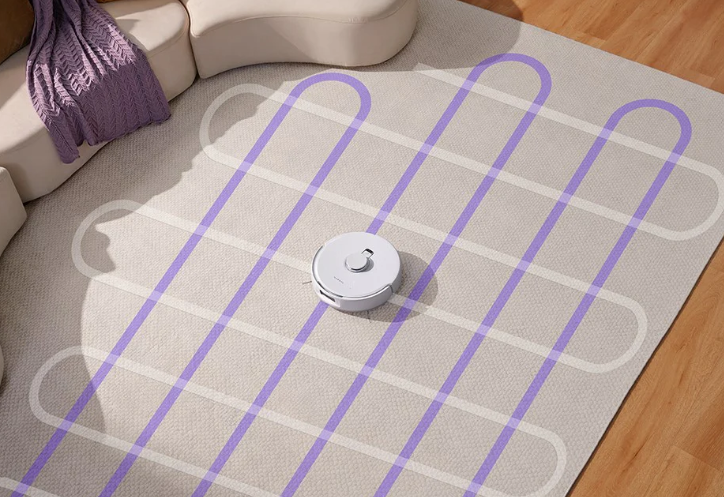
Robot vacuums save time and effort, automatically cleaning, mopping, charging, and self-cleaning. Regular maintenance is essential to ensure efficient operation and longevity. Consistent upkeep guarantees lasting performance.
Common Maintenance Guide
Here’s a guide to help you maintain your robot vacuum.
Cleaning the Brushes
- Frequency: Every one to two weeks.
- Method: Use a small brush or toothbrush to clean the main and side brushes. Remove tangled hair, string, and debris, which affect suction and brush performance.
- Consider replacing brushes if necessary.
Cleaning the Vacuum Filter
- Frequency: Every one to two months, depending on usage.
- Method: Open the filter and rinse it with water if washable, ensuring complete drying before reinstalling. For non-washable filters, clean with a vacuum or small brush.
- Consider filter replacement as needed.
Emptying the Dustbin
- Frequency: After each use or daily.
- Method: Empty the dustbin promptly and wipe the interior regularly with a damp cloth.
Cleaning the Wheels
- Frequency: Monthly.
- Method: Inspect wheels for tangled debris or hair, especially the drive wheels. Clean thoroughly to ensure smooth movement.
Checking the Sensors
- Frequency: Monthly.
- Method: Gently wipe sensors with a soft cloth to maintain navigation and obstacle avoidance performance.
Software Updates
- Frequency: Every few months, depending on model.
- Method: Check for firmware updates via the robot’s app or official website.
Cleaning the Charging Dock
- Frequency: Monthly.
- Method: Clean the metal charging contacts to ensure proper charging.
Routine Maintenance Tips
This section outlines essential maintenance tasks to optimize your robot’s performance.
Roller Brush Maintenance
- Recommended Frequency: Weekly
- 1. Flip the machine and press the buckle on the roller brush cover to remove it.
- 2. Remove the roller brush.
- 3. Use the provided cleaning brush to remove dust from the main brush and cavity. Clean entangled objects.
Side Brush Maintenance
- Recommended Frequency: Weekly
- 1. Flip the machine and pull out the side brushes vertically.
- 2. Remove entangled hair and dirt, then reinstall the brushes.
- 3. Align the left (L) and right (R) side brushes with the corresponding letters on the bottom cover, and press to reinstall.
Note: Replace side brushes every three months to maintain cleaning effectiveness.
Dust Box and Filter Maintenance
- Recommended Frequency: After each cleaning.
- 1. Remove the machine cover and lift the dust box handle to take it out.
- 2. Press the dust box switch to open and empty.
- Use clean water for washing; avoid detergent.
- Do not use brushes or fingers to clean the filter.
- Dry filters thoroughly for at least 24 hours.
- Replace filters every three months.
Dust Box Cleaning
- After extended use, remove the filter gauze and HEPA filter.
- Wash the prefilter and dust box under the faucet (avoid water on the HEPA filter).
- Remove water droplets and fully dry before use. Press the dust box switch to open and empty.
Sensor Cleaning
- Clean the infrared anti-collision sensor monthly.
- Clean the cliff sensor monthly.
- Clean the charging contact regularly.
- Clean the signal transmission zone monthly.
Firmware Upgrade
Start the smartphone app and enter the firmware upgrade page. Follow the instructions to upgrade when new firmware is detected. Ensure power is at least 50%, or place the machine on the docking station during the upgrade.
Battery Maintenance
- The machine includes a high-performance rechargeable lithium battery pack. To maintain battery performance, keep the machine charging daily. If not using the machine for a long time, power it off and store it properly. Charge the machine at least once every 3 months to avoid battery damage due to excessive discharge.
Getting Started with Your Robot Vacuum
Before using your robot vacuum, proper setup is crucial.
Choosing the Best Robot Vacuum
The ideal robot vacuum depends on floor type and cleaning needs. Consider options designed to simplify home cleaning. Models are available that adjust automatically between carpets and hard floors, ensuring thorough cleaning and anti-hair tangling features. These are suitable for homes with pets or long hair. Advanced models with AI-powered navigation and real-time cleaning decisions adapt to dirt types and switch between vacuuming and mopping. Their self-cleaning and self-drying mop features reduce maintenance.
Connecting Your Robot Vacuum to Wi-Fi
- Power On: Place the robot on a level surface near a power outlet and press the power button.
- Download the App: Find the corresponding app for your vacuum (e.g., Narwal) and download it.
- Link to Wi-Fi: Launch the app and connect the vacuum to your home Wi-Fi, typically on a 2.4 GHz network.
- Verify Connection: The app confirms a successful connection.
Installing the App and Setting Preferences
- Launch the App: Sign up or log in to unlock settings and features.
- Add the Vacuum: Select the option to add your robot vacuum and follow instructions.
- Customize Settings: Adjust cleaning modes, schedules, and no-go zones.
Charging the Vacuum Before First Use
- Place on Charging Dock: Position the vacuum on its charging dock, ensuring the dock is connected to a power outlet.
- Let It Charge Fully: Allow 3-4 hours for a full charge.
- Check Charging Progress: Monitor the charging status via light or app message.
Setting Up Your Robot Vacuum’s Cleaning Schedule
Leverage the automatic cleaning capabilities of your robot vacuum to save time and ensure a consistently clean home.
Accessing the Scheduling Feature
- Open the App: Navigate to the main screen for vacuum control.
- Locate Scheduling Option: Find the ‘Schedule’ or ‘Cleaning Schedule’ tab.
- Select the Desired Time: Choose a convenient time, confirming the schedule in the app.
Set schedules when floors are clear of obstructions for better navigation.
Adjusting the Frequency of Cleaning
Base cleaning frequency on your home’s size and foot traffic. The vacuum can be set to clean daily, every other day, or weekly to fit your needs.
| Situation | Suggested Frequency | Best Time to Run | Additional Tips |
|---|---|---|---|
| High Traffic Areas (Living Room, Kitchen) | Daily | Early Morning, Late Evening | Frequent cleaning keeps dust under control. |
| Moderate Traffic Areas (Bedrooms, Offices) | Every Other Day | Midday, Evening | Less frequent cleaning is suitable for moderate use. |
| Low Traffic Areas (Guest Rooms, Storage) | Weekly | Anytime | Weekly cleaning is sufficient for less-used spaces. |
| Homes with Pets | Daily | Early Morning, Late Evening | Daily cleaning helps manage pet hair and dander. |
| Smaller Homes (Apartments) | Every Other Day | Anytime | Every other day cleaning keeps smaller spaces clean. |
Choosing Your Preferred Cleaning Modes
- Eco Mode (for Regular Cleaning): Ideal for daily maintenance, using less power for light cleaning.
- Max Mode (for Deep Cleaning): Increases suction for carpets or heavily soiled areas.
- Edge Mode (for Walls and Corners): Cleans along edges and corners.
Optimizing the Cleaning Modes for Different Areas
- Living Room & Bedrooms: Use Eco Mode during unoccupied times.
- High-Traffic Areas: Set Max Mode for deeper cleaning in kitchens or hallways.
- Pet Areas: Schedule cleaning during the day using Max Mode.
- Hardwood & Tile Floors: Use Eco or Edge Mode to keep floors spotless without excessive power.
Many robot vacuums automatically adjust power based on the surface, optimizing battery use.
Monitoring and Adjusting the Schedule as Needed
- Track Cleaning Progress: Monitor cleaning sessions in real-time via the app.
- Modify the Schedule: Adjust cleaning times, modes, or add extra cleanings as needed.
If the vacuum misses spots or gets stuck, adjust the cleaning path or add virtual barriers.
Maximizing Robot Vacuum Efficiency
Proper setup and regular upkeep are essential for optimal performance.
Clearing the Area Before Cleaning
- Remove Obstacles: Clear wires, small toys, and furniture.
- Set Virtual Barriers: Keep the robot away from sensitive areas.
Tailoring the Cleaning Path
- Focus on Key Areas: Direct the robot to areas needing extra attention with custom cleaning paths.
- For example, you can set more frequent cleaning in the kitchen.
Maintaining Brushes and Sensors
- Wipe down sensors regularly to ensure accurate navigation.
- Inspect brushes after each cleaning to remove hair or debris.
Daily Maintenance for Peak Performance
- Empty dustbin after every cleaning.
- Check brushes and replace filters as needed.
- Inspect wheels for debris.
Troubleshooting Common Issues
Address common problems to keep your robot vacuum running smoothly.
- Vacuum Stops Mid-Cleaning: Check the battery level and recharge.
- Vacuum Gets Stuck: Remove obstacles around tight spaces and reset.
- Poor Suction Power: Clean the filter and brushes.
Conclusion
Using a robot vacuum daily saves time and effort. Regular maintenance, scheduling, and obstacle removal ensure top performance.
A robot vacuum is a smart investment for efficient cleaning. Enjoy a cleaner home with less work.
The vacuum and mop robot is efficient cleaning tools that can achieve vacuuming and mopping in one go.